Blog
GitHub stacked PRs: how to use gh stack or plain Git
Stacked PRs split one big change into small, dependent pull requests. How to stack with plain Git, GitHub's native stacks and open-source tools.
Alex Mercer
Stacked PRs (stacked pull requests) split one large change into a chain of small pull requests, where each one builds on the branch of the one below it. The bottom pull request targets main, each one above it targets the branch beneath it, and the stack merges from the bottom up, so reviewers read one small diff at a time while you keep building on top.
GitHub has native stacked PRs, generally available on all github.com plans since October 6, 2026, and a gh stack extension for GitHub CLI that handles the local side. You can also stack with plain Git and two rebase options, or with open-source tools such as ghstack, spr (the ejoffe/spr project), git-branchless and Sapling. If you want the basics first, read how to review a pull request on GitHub.
What a stack looks like
A three-layer stack for a rate limiter looks like this in git log:
Each branch becomes one pull request:
Pull request | Branch | Base branch | What reviewers see |
|---|---|---|---|
#1 |
|
| The token bucket and its config |
#2 |
|
| Only the change to |
#3 |
|
| Only the new header |
Reviewers of #2 don't see #1's code because GitHub computes a pull request's diff from the point where its branch split off the base branch (GitHub calls this a three-dot diff). The base of #2 is rate-limiter, so its diff holds only its own commit.
GitHub's docs call this the key principle: "if code in one layer depends on code in another, the dependency must be in the same branch or a lower one." Order the layers so each one can merge without anything above it.
You'll also see the term stacked diffs, usually where each commit is reviewed on its own, as in Gerrit. Tools such as ghstack, spr and Sapling bring that model to GitHub by opening one pull request per commit.
Why teams stack pull requests
The case for stacking is the case for small pull requests, minus the waiting. GitHub's docs and launch post list the benefits:
You can "open a new pull request on top of one that is still open," instead of waiting for the first one to merge.
Smaller, focused pull requests are "faster to review, less likely to be skimmed, and less likely to go stale."
Different reviewers can take different layers at the same time.
Stacking is one way to cut the wait for review. How to speed up PR reviews on GitHub covers others, such as automating routine checks.
AI coding agents can build several dependent changes before a reviewer catches up. Each layer still needs review. Use AI code review alongside human review, and keep each diff small enough to understand. cubic's Bug Bench tracks bugs its reviews find in AI-written code; its observational results depend on both the model and the work it was used for.
The cost is upkeep. Every change to a lower layer has to flow up through the branches above it, and GitHub's own docs call rebasing "the trickiest part" of the workflow. GitHub's native stacks automate most of it, and plain Git handles it with two rebase options.
GitHub stacked PRs and the gh stack extension
Before you start, use a current GitHub CLI, authenticate with gh auth login, and make sure you can push branches to the repository. The plain-Git --update-refs examples below need Git 2.38 or later.
GitHub released native stacked pull requests in public preview on July 30, 2026, and made them generally available on October 6, 2026, on all github.com plans. Its rollout guide says the feature needs "no setup or enablement." It ties the pull requests in a stack together and does most of the rebasing that the plain Git steps below do by hand.
What GitHub adds:
A stack map. Each pull request in a stack shows a stack icon with its layer number, and the merge box lists every pull request in the stack with its status.
Per-layer diffs. Each pull request shows only the diff for its layer.
Rules on every layer. Required reviews, required status checks and CODEOWNERS are enforced against the stack's base branch for every pull request in the stack. A GitHub Actions workflow that runs on pull requests targeting the default branch runs for all of them, mid-stack ones included.
Merging from any layer. Stacks merge from the bottom up. Merging a pull request in the middle merges everything below it too, and the remaining branches are rebased automatically so the next pull request targets the base branch. Merge commits, squash merges and rebase merges all work, and stacks are merge-queue aware.
The gh stack extension for GitHub CLI handles the local side (quickstart):
To change a lower layer, check it out with gh stack down or gh stack checkout, commit, then run gh stack rebase --upstack to rebase everything above it and gh stack push to push (it uses --force-with-lease for each branch). After a merge, gh stack sync --prune fetches, fast-forwards your trunk branch, rebases what's left, pushes, and deletes the local branches of merged pull requests. GitHub's CLI reference notes that gh stack rebase automatically switches to --onto mode when a branch's pull request has merged, the same fix as step 3 of the plain Git steps below. If you built a stack with plain Git, gh stack link links the existing pull requests into a stack without local tracking.
Limits to know before you switch:
Every branch must live in the same repository. GitHub's docs say "Cross-fork stacks are not supported," and its rollout guide adds that a stack follows "a single, linear chain of branches."
GitHub Desktop doesn't support stacks.
Unstack dissolves a stack, but merged and queued pull requests stay in it.
Review stacked PRs in cubic
Build your stack with gh stack or plain Git, then review it in cubic. Open a pull request from your cubic inbox, or replace github.com with cubic.dev in its URL. Your comments and submitted reviews sync with GitHub.
See what needs attention in the inbox
The pull request inbox groups PRs connected by their base and head branches, even before they form a native GitHub stack. A thin thread connects the related rows. Needs you, Ready to merge and Waiting on others show who needs to act next.

cubic's inbox organizes pull requests by the next action they need.
Review each layer from the PR page
The PR header's status-colored stack rail shows the layers. Click it to list the stack, or press [ for the PR below and ] for the one above. Read the diff and submit a review on each layer.
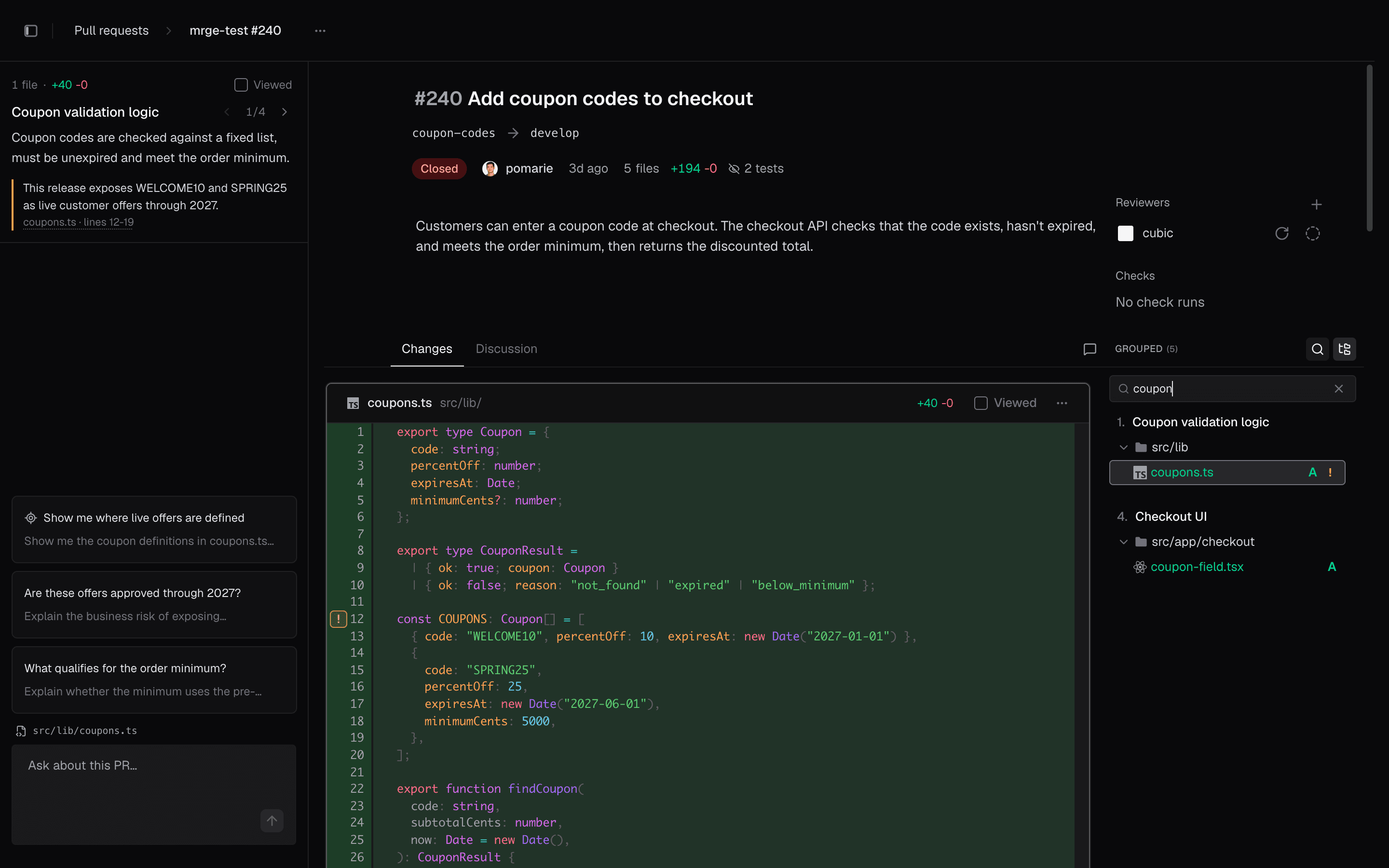
The PR page brings the diff, file navigation and review context together.
Check which PRs will merge
For a native GitHub stack, the Merge menu includes the selected PR and all unmerged PRs below it, with a badge showing the count. Required reviews, checks, conflicts and permissions still apply. Auto-merge is unavailable for stacked PRs in cubic; branches that require a merge queue use Add to merge queue.
PRs only grouped by their branches in cubic still merge individually, from the bottom up. Convert them to a native GitHub stack before merging them as a group.
How to stack PRs with plain Git
Plain Git and GitHub's regular pull requests are enough to run a stack. It takes three moves: branch on branch, --update-refs when a lower layer changes, and --onto after the bottom one merges.
1. Branch on branch
Open one pull request per branch and set each base to the branch below it: #1 into main, #2 into rate-limiter, #3 into search-limits. If you open one against main by mistake, edit the pull request and pick a new base from the base branch menu next to its title.
In each description, say where the pull request sits ("2 of 3, builds on #1") and link the others. A code review checklist and copyable PR template with a short "Stack" section turns that into a habit.
2. Update lower layers with --update-refs
Say a reviewer asks for a change in #1. If you commit the fix on rate-limiter, the two branches above still sit on the old commits. Git 2.38 added git rebase --update-refs, which will "automatically force-update any branches that point to commits that are being rebased."
From the top of the stack, commit the fix as a fixup of the commit it belongs to, then rebase:
Git builds the to-do list with the fix in place and an update-ref line for each of the other branches in the stack (Git 2.50 and later also put a # before each commit subject):
Save it, and all three branches move together:
Then push every layer. The rebase rewrote them, so this is a force push, and --force-with-lease refuses the push if the remote branch no longer matches the remote-tracking tip Git expects:
To make --update-refs the default, run git config --global rebase.updateRefs true. One catch from the manual: branches checked out in another worktree aren't updated.
3. After the bottom pull request merges, use --onto
After the merge, update your local main before running the examples below. Start with a clean working tree. If the fast-forward fails, stop and resolve the local divergence before restacking.
When #1 merges, #2 has to point at main. GitHub does that for you if the merged branch gets deleted: it "checks for any open pull requests in the same repository that specify the deleted branch as their base branch" and changes their base to the merged pull request's base branch. Turn on Automatically delete head branches in the repository settings and this happens on every merge, unless branch protection or repository rules block the deletion. If the branch stays, change #2's base yourself before you merge it, because a pull request merges into its base branch, not into main.
The merge method decides what comes next. With a merge commit, #1's commits land on main unchanged, and the layers above need no extra work. With rebase and merge, they land as copies with new IDs, and when you rebase #2 onto main, Git detects commits that are "clean cherry-picks" of ones already upstream and drops them. Squash and merge is the tricky one: main gets one new commit, and #2 still carries #1's original commits.
In this stack, #1 picked up a review fix that changed a line its first commit added, and then got squash-merged:
Once #2 targets main, its diff starts from the old split point, so it shows #1's files again even though main already has them:
A plain git rebase main on search-limits replays all four of its commits. Git skips commits whose changes are already upstream, but #1's first commit set rate=10 and main has the reviewed rate=100, so it conflicts:
Run git rebase --abort to back out of that rebase. git rebase --onto avoids the problem by replaying only the commits that come after the old bottom branch:
Read it as "take the commits after rate-limiter, up to retry-after, and replay them onto main." Run it before you delete your local rate-limiter branch, since that branch is how Git knows where #1's commits end. Then force-push the remaining layers with --force-with-lease.
Open-source tools for stacked diffs
Open-source stacking tools mostly take the commit-based approach: you work on a series of commits, and the tool turns each one into a review.
Tool | Unit of review | How it works | Watch for |
|---|---|---|---|
ghstack | One commit | Pushes each commit as its own pull request, on branches it manages under | You land with |
spr (ejoffe/spr) | One commit |
|
|
git-branchless | Stacks of commits | Local commands to view, move, restack and sync stacks, plus | In alpha, and its README says to be prepared for breaking changes |
Sapling | One commit |
| Each pull request also contains every commit below it, which "will not 'look right' on GitHub" |
Gerrit | One commit (a change) | Its own review server: you push to | A change can only be applied once the changes it depends on are |
A few details from each project's docs:
ghstack exists to "conveniently submit stacks of diffs to GitHub as separate pull requests." It creates
base,headandorigbranches for each commit, and its README warns that "you will NOT be able to merge these commits using the normal GitHub UI, as their branch bases won't be main." That's why it shipsghstack land.spr (ejoffe/spr) sums itself up as "Each commit becomes a pull request." You write commits on one branch, and
git spr updatekeeps the pull requests in sync with them.git-branchless adds
git sl(a smartlog of your stacks),git move,git restackto repair a broken stack,git syncto rebase all your local stacks at once, andgit undo.Sapling, from Meta, works with GitHub repositories, and some of its GitHub features rely on the GitHub CLI. Because each of its pull requests includes the commits below it, its docs recommend reviewing in ReviewStack, which shows "only the commit that is intended to be reviewed for each pull request."
Gerrit matches commits to changes by their
Change-Id, so pushing an amended commit adds a new patch set to the same change. You can "base a new feature on an open change," which creates a dependency between the two changes.
Common pitfalls with stacked PRs
Restacking with a plain rebase after a squash merge. The upper layers still carry the bottom layer's original commits. Use
git rebase --onto(orgh stack sync), as shown above.Merging a layer into a stale base. A pull request merges into its base branch. If #2 still targets
rate-limiterafter #1 merged, merging #2 puts it onrate-limiter, notmain. Retarget first, or let GitHub delete merged branches so it retargets for you.Approvals that disappear. When you restack and push, every layer above the change gets new commits. If your branch rules dismiss stale approvals, GitHub dismisses approvals when pushed commits affect a pull request's diff, so expect to ask for a fresh approval on any layer whose diff changed. Since general availability, GitHub's own Rebase stack keeps approvals on layers whose diff hasn't changed, even when stale approvals are dismissed. Its docs don't say whether the automatic rebase after a merge does the same.
Plain force pushes. Every restack rewrites the upper branches, so every update is a force push. Use
--force-with-lease, which refuses the push if the remote branch no longer matches the remote-tracking tip Git expects.gh stack pushdoes this for you.Dependencies in the wrong layer. If #1 needs code that lives in #2, #1 can't merge on its own. Keep each layer's dependencies in the same layer or below it.
Stacks across forks. GitHub's native stacks need every branch in the same repository, and ghstack needs write access, so neither fits contributions from forks.
FAQ
What are stacked diffs?
Stacked diffs are the commit-based version of stacked PRs: each commit in a chain gets its own review, and later commits depend on earlier ones. Gerrit works this way, and ghstack, spr (ejoffe/spr) and Sapling bring the model to GitHub by opening one pull request per commit.
Does GitHub support stacked pull requests?
Yes, generally available since October 6, 2026, after a public preview that began July 30. GitHub's docs say no setup is needed. You can create stacks with the gh stack extension for GitHub CLI or on github.com, and GitHub rebases and retargets the remaining layers when a lower one merges. Without the feature, you can still stack by setting each pull request's base to the branch below it.
Are stacked PRs worth it?
They pay off when one change splits naturally into dependent steps and waiting on review is slowing you down. The cost is keeping branches in sync, which git rebase --update-refs or gh stack mostly handles. If the changes don't depend on each other, open separate pull requests against main instead.
How do you merge stacked PRs?
From the bottom up. With GitHub's native stacks, merging a pull request also merges every unmerged pull request below it, and the rest are rebased onto the base branch. With plain branches, merge #1, make sure #2 now targets main, restack with git rebase --onto if #1 was squash-merged, then merge #2.
Can you squash and merge stacked PRs?
Yes. GitHub's native stacks support merge commits, squash merges and rebase merges. With plain branches, a squash merge leaves the upper layers holding commits that main doesn't have, so restack them with git rebase --onto before you merge the next one.
