Blog
Secure code review: a practical guide with real examples
A practical secure code review guide: eight steps for checking a pull request, a checklist, and real auth bypasses found in vinext and OpenClaw.
Alex Mercer
Say you built a Pages Router app on Cloudflare's vinext in February 2026 and put your login check in proxy.ts, exported as proxy. In development, the check ran. In production, it silently didn't.
The production build looked for a default export or one named middleware, but never one named proxy, the name Next.js 16 uses. When it found nothing, it let the request through:
A secure code review reads each change for what happens when a check fails or never runs. Read the second line that way and the bug is plain. No function means { continue: true }, and the request reaches the page unchecked. We found it with a cubic codebase scan and sent the fix upstream, and our post on the vinext auth bypass has the full story.
This blog belongs to cubic (cubic.dev), an AI code review tool, and both real bugs in this guide come from our own research, so weigh what we say about AI reviewers accordingly. The method works with or without one.
What is a secure code review?
A secure code review is a review of source code for security flaws: access checks that are missing or never run, untrusted input that reaches a dangerous call, secrets in the wrong place, and failures that let a request through. Security code review is another name for it.
OWASP's Secure Code Review Cheat Sheet describes it as manually examining source code for the vulnerabilities automated tools often miss, and names two kinds:
Baseline reviews read the whole codebase, for new applications, major releases, legacy systems, compliance and after incidents.
Diff-based reviews read only what changed, as part of pull requests.
Most teams can't run baseline reviews often, so this guide covers the diff-based kind.
Secure code review examples: two auth bypasses
The vinext bug got past more than 1,700 Vitest tests and 380 Playwright end-to-end tests, including tests ported from Next.js, according to Cloudflare's launch post. Next.js has a test for the failure underneath it, which checks that a proxy file without the expected export throws an error. As issue #204 explains, vinext never ported it because middleware already looked covered.
The development server accepted proxy and only the production code didn't, so one piece of logic lived in two places and drifted apart. And both copies let the request through when they found nothing. The maintainers' follow-up, PR #203, made a proxy file without a valid export throw an error, as it does in Next.js. The first fix added a missing name. The second made the code fail closed.
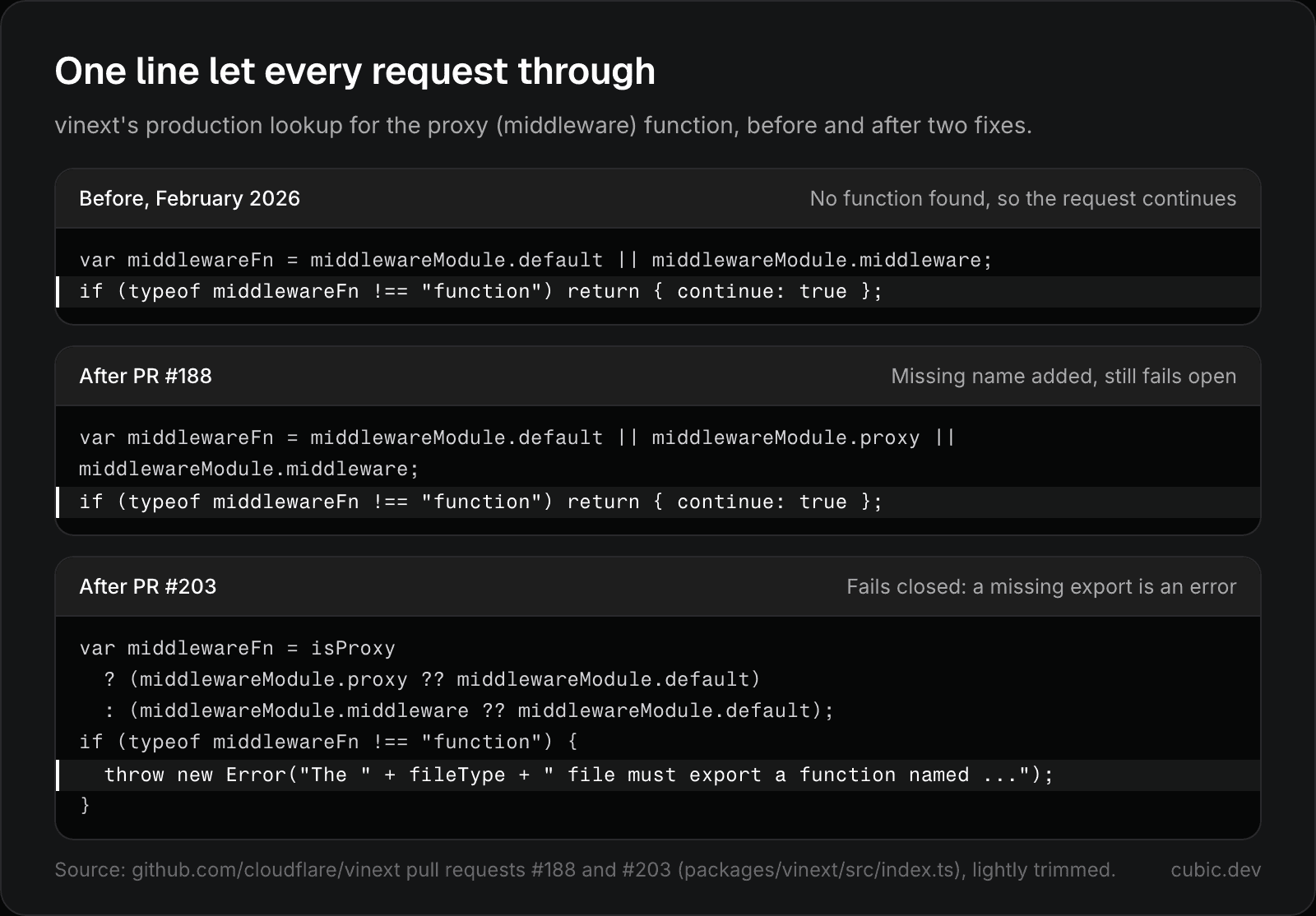
vinext's production proxy lookup before and after two fixes. The first added the missing name; the second made a missing export an error.
The second example comes from OpenClaw, the open-source AI agent that can read your files, send email and run terminal commands for you. Its voice-call feature lets you allowlist the phone numbers that may call your agent. Here's the check:
It looks fine until you block your caller ID. Twilio then sends "anonymous", stripping the non-digits leaves an empty string, and every string ends with an empty string, so the allowlist accepted anyone who hid their number. Suffix matching also let +5550001234 pass as +15550001234. The same check lived in manager.ts and events.ts, and our fix had to change both. The maintainers shipped their own version of the same change on main the same day (f8dfd03). Our OpenClaw write-up covers three more flaws from the same scan.
Neither bug matches a known bad pattern, which makes both easy to approve. Each falls to a short question:
What happens when the check finds nothing?
What's the weakest input that still passes?
Is there a second copy of this logic?
Secure code review vs SAST vs penetration testing
If you already run a scanner, the question is what review adds. Each method sees a different part of the problem:
Method | Looks at | Catches | Misses |
|---|---|---|---|
Secure code review | Each change, with its intent | Missing access checks, logic flaws, code that fails open | Anything the reviewer skips |
SAST | Source code, without running it | Known patterns, such as SQL built from strings, | Flaws with no pattern, such as a check that never runs |
Dependency scanning (SCA) | Your lockfile, against advisory databases | Known CVEs in the versions you use | New malicious packages and unreported flaws |
Pen test or DAST | The running app, from outside | What an attacker can reach in a real deployment, including misconfiguration | Code paths the testers never hit |
Run the vinext bug through that table. A SAST rule needs a bad pattern, and return { continue: true } isn't one. A pen test would have caught it only on a production build of an app that used a named proxy export. A reviewer who asked what happens when the lookup fails would have seen it in one line.
Our view: keep scanners for known patterns and CVEs, test what you deploy, and make security review part of every pull request. It's the only one of the four that checks code against what it's meant to do.
How to do a secure code review of a pull request
Don't run all eight steps on every PR. Do step 1 on everything, and the rest when the change adds a way in, crosses a trust boundary or changes who can do what.
1. Threat-model the change
Before you read any lines, spend two minutes on what the change exposes: a new entry point, such as a route, a webhook, a CLI flag or a tool an AI agent can call; data crossing a trust boundary; or a change in who can do what.
If it exposes none of these, review the PR for correctness and move on. If it does, note it in one line in the PR description, such as "new public webhook, signature checked in verifyStripeSignature()". OWASP suggests STRIDE as a prompt: spoofing, tampering, repudiation, information disclosure, denial of service and elevation of privilege.
The threat model also tells you what not to flag. OpenClaw gives its agent full system access by design, so that alone isn't a finding. A chat message that can steal the gateway's admin credentials is.
2. Trace untrusted input to sinks
List where outside data enters the change: request bodies, headers, query strings, uploads, webhook payloads and AI model output. Follow each value to where it's used, such as a SQL query, a file path, a shell command, rendered HTML or a log line. Each path needs a check that fits its sink, such as a parameterized query or output encoding.
Then confirm that every input reaching the sink goes through that check. OpenClaw's message tool checked path and filePath against the sandbox root but not media, so media: "file:///etc/passwd" read the file with the sandbox on (fix merged as #9182). When a PR adds a parameter, look for the validation its siblings get.
3. Check authentication and authorization at every entry point
For each new or changed entry point, find the line that checks who the caller is and the line that checks what they may do. If you can't find them, that's your finding. Broken access control is #1 in the OWASP Top 10:2025, which found some form of it in 100% of the applications tested.
Check the object as well as the user. A request for /invoices/123 must confirm that invoice 123 belongs to the caller, or you have an insecure direct object reference. Check sensitive functions on their own too. OpenClaw's whatsapp_login tool was open to every allowlisted contact, not only the owner, so any of them could hijack the agent's WhatsApp connection.
Be wary of checks that live far from the route. In CVE-2025-29927, which GitHub scored 9.1, critical, a request carrying the internal x-middleware-subrequest header could skip Next.js middleware and every auth check in it. Next.js used the header to stop middleware from calling itself in a loop, and trusted it from outside. Vercel's postmortem says plainly that it does "not recommend Middleware to be the sole method of protecting routes." Next.js's proxy docs add that a matcher change can silently remove proxy coverage, and tell you to check auth inside each Server Function rather than rely on proxy alone.
4. Look at data exposure and logging
Check what leaves the system. An endpoint that returns a whole user record when the page needs a name sends out password hashes, tokens and every field someone adds later. A log line that prints request headers prints the Authorization header too. Also watch for error responses that include stack traces or SQL.
5. Check secrets and config
Search the diff for keys, tokens and passwords, test fixtures included. Then follow each credential to where it's sent. OpenClaw's gateway client attached the configured admin token to whatever gateway URL it was given. Simplified, the lookup was:
A tool call could override that URL, so a chat message or a prompt injection could point the client at wss://attacker.example/ws and collect the token. The merged fix requires explicit credentials for any overridden URL and throws an error without them. OpenClaw had fixed the same class of bug in another code path, its Control UI, in January as CVE-2026-25253.
In config changes, look for debug flags, CORS rules that accept any origin with credentials, cookies without HttpOnly, Secure and SameSite, and defaults that are only safe in development.
6. Check dependencies
Every new package is code nobody on your team reviewed. Check that it exists, that its name is exactly the one you meant, who maintains it, and whether it runs install scripts. Read the lockfile diff too.
AI makes this harder. In a USENIX Security 2025 study of 16 code-generating models, on average at least 5.2% of the packages that commercial models suggested didn't exist, and 21.7% for open-source models. An attacker can register those names and wait for installs. Dependabot or npm audit flags packages with published advisories, not a malicious one nobody has reported yet.
7. Check error handling
When something fails, the code should deny access. OWASP's Top 10:2025 added a category for code that doesn't, A10 Mishandling of Exceptional Conditions, which includes failing open. The vinext bug was a fail-open default, and its lasting fix was to throw. Watch for:
a
catchblock that returnstrue, callsnext()or sends a success responsean auth helper that returns
nullon error, and a caller that readsnullas alloweda timeout on a permission check that defaults to allow
8. Check infrastructure-as-code and CI diffs
In Terraform, Kubernetes manifests and Dockerfiles, look for 0.0.0.0/0 on anything but a public load balancer, public storage buckets, IAM policies with * in actions or resources, and containers that run as root or with privileged: true.
In GitHub Actions, a pull_request_target workflow that checks out the PR's code runs a stranger's code with access to your secrets, and GitHub's security guide warns this can lead to a repository takeover. The same guide calls pinning an action to a full commit SHA the only way to use it as an immutable release. In March 2025, an attacker moved the version tags of tj-actions/changed-files to malicious code that exposed CI secrets in workflow logs, tracked as CVE-2025-30066. Workflows pinned to a commit SHA didn't pick up the moved tags, as Wiz's write-up of the incident notes.
Secure code review checklist
Use this table as a last pass over the diff. OWASP's cheat sheet adds checklists for sessions, cryptography and business logic.
Area | Check | Red flag in the diff |
|---|---|---|
Input | The server validates every outside value, with allowlists where possible | A new parameter that skips its siblings' validation |
Injection | Queries, commands and templates take parameters |
|
Files and URLs | Paths stay in one directory, and the server fetches only allowed URLs |
|
Authentication | Every entry point checks identity before doing any work | Auth only in middleware or proxy, a changed route matcher |
Authorization | The caller may act on this specific object |
|
Matching | Allowlists compare exact values and reject empty ones |
|
Data exposure | Responses and logs carry only what they need | Whole records in responses, tokens in logs |
Secrets | No secrets in code, and credentials go only where you intend | Hardcoded keys, credentials sent to a URL the caller chose |
Dependencies | Each new package exists, is the one you meant and has a maintainer | Unknown names, install scripts, a big lockfile change |
Errors | Failures deny access and hide internals | A |
Duplicates | Every copy of the changed logic gets the fix | A check that also lives in a dev path or a second module |
Infra and CI | Network, storage, IAM and workflow permissions stay narrow |
|
For the rest of a review, use our code review checklist.
AI security code review: what it catches and what it misses
An AI reviewer reads the diff with the rest of the repository in view. That suits bugs with no bad pattern, only a missing or inconsistent piece: a handler without its siblings' permission check, a parameter that skips shared validation, a copy of a check that a fix forgot.
The OpenClaw allowlist shows why that last one matters. The same check lived in manager.ts and events.ts, so a fix that patched one file would have left the other open. Someone reading only the diff can't see a file that isn't in it.
Our split: an AI reviewer takes the first pass on every PR, SAST covers known patterns and audits, and people own the threat model and which risks are acceptable.
AI reviewers miss bugs and flag non-issues, so treat their comments as leads. They also read text an attacker can write. Anthropic's README for its own security review GitHub Action says the action isn't hardened against prompt injection and should only review trusted PRs. If strangers can open pull requests on your repository, require a maintainer's approval before workflows run.
Three ways to add an AI security pass:
Before you push. Claude Code's
/security-reviewcommand checks your branch's diff for injection, auth issues and data exposure.On a PR, from Codex. Commenting
@codex security reviewruns a security pass on ChatGPT Pro, Business, Edu and Enterprise plans, and can use a threat model kept in your repository.On every PR, from cubic. Our reviewer works on GitHub only, and you can write a rule like "every route under
/api/adminmust callrequireAdmin()" as a custom agent in plain English. Our codebase scans, which found both bugs above, are in beta, by request, on the Pro and Max plans.
To compare reviewers, see our list of the best AI code review tools, and for how they work, our guide to AI code review.
Why AI-generated code raises the stakes
Cloudflare says AI wrote almost every line of vinext, with one engineer directing it for under a week at about $1,100 in tokens. In our analysis, the code held up where ported tests existed and broke where they didn't.
Veracode's 2026 GenAI Code Security Report puts the average security pass rate of the models it tested at 56%, barely changed from 55% in its first report, even though models now write syntactically correct code nearly every time. Code that compiles says nothing about access control.
So run the eight steps on AI-written pull requests, and assume edge cases are missing until you see them handled. Our guide on how to review AI-generated code covers the other ways agent-written code fails.
Questions and answers
Is AI-generated code safe?
Not by default. Veracode's 2026 tests put the average security pass rate of AI models at 56%, so review AI-written changes like any untrusted contribution, and look hardest at authorization and error paths.
Which is the best SAST tool?
None is best for everyone. Pick one that covers your languages and runs on every PR without burying you in alerts. CodeQL is free on public GitHub repositories, needs a GitHub Code Security license on private ones, and doesn't support PHP or Scala. Semgrep's open-source engine uses rules that look like the code they match. Pair either with review.
How often should you do a secure code review?
OWASP suggests a diff-based review on every pull request, and a baseline review of the whole codebase at major releases, after architecture changes and after security incidents.
If you can't point to the line that denies access, assume nothing does.
If your code is on GitHub, try cubic on your next pull request that touches auth. The free plan includes 20 PR reviews a month, and paid plans start with a 7-day trial that needs no card.
